Manage Teams and Groups
Create teams as business units in your organisation context, one at a time or by importing a file, and check the import error report.
Create Teams and Add Team Members
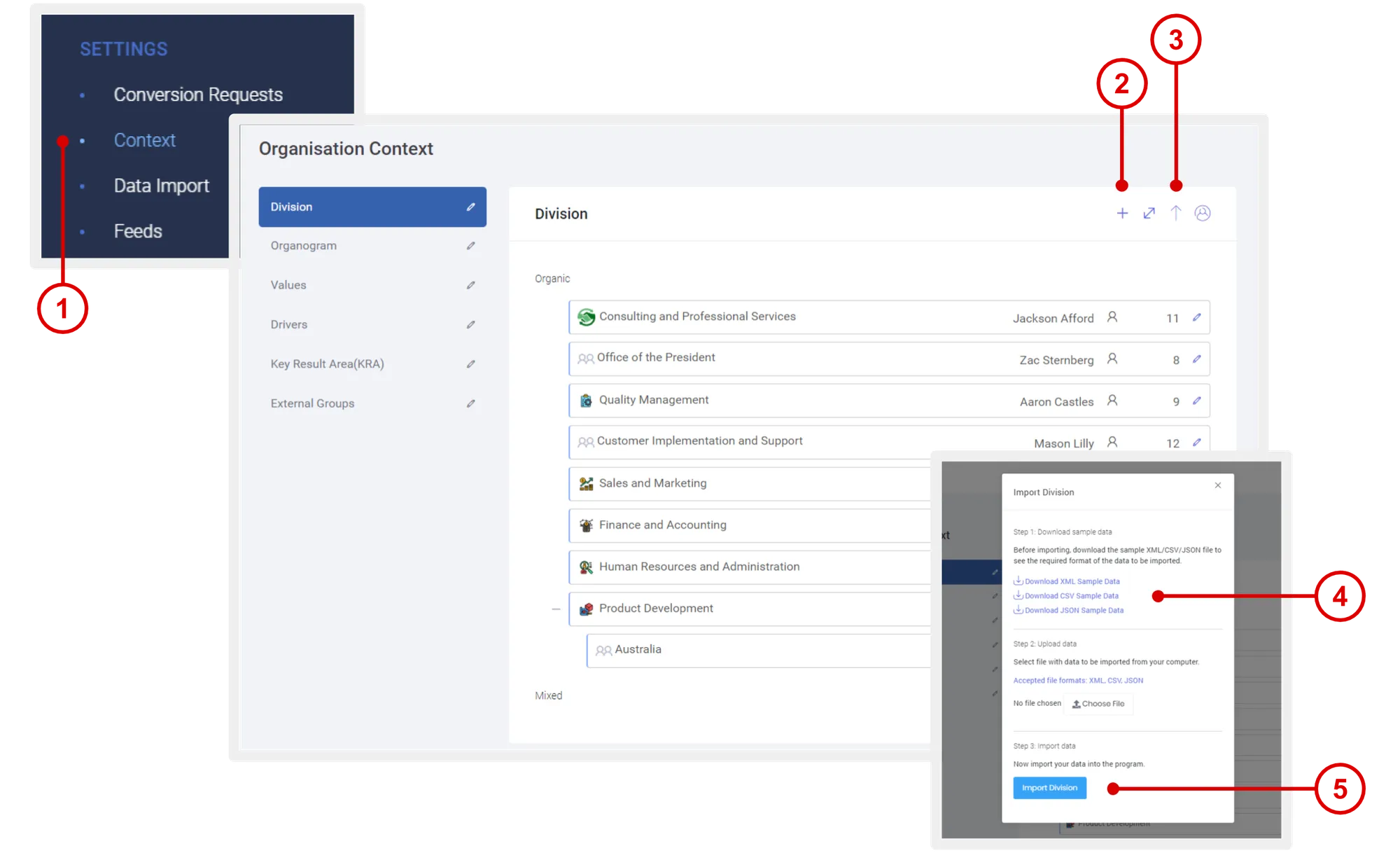
- On the left navigation menu, click Settings > Organisation Context.
- Select the BUSINESS UNITS context, then click the ADD icon.
- You can also choose to import a list of BUSINESS UNITS by clicking on the IMPORT icon.
- Before importing, we recommend that you click the DOWNLOAD SAMPLE DATA link to see the required format of the data to be imported.
- Once you’re ready to import, click Choose File to select the import file from your computer, and click Import to run the import.
If there are any errors with the import, you will be shown a report of the errors after the system is done running the import. Follow this process in setting up the rest of your organisation context.
Context Description
- Unit: For segregating your pool employees or partners into groups. Specific programs, campaigns or offers can be made available based on units or groups.
- Organogram: Organisational structure of hierarchy presented in the program.
- Values: Company or organisational values.
- Drivers: Business drivers.
- KRA: Company key result areas.
- External Groups: For segregating your pool of member user-types. Specific programs, campaigns or offers can be made available based on units or groups.
Need more help?
For questions about setting up or running your program, email hello@rewardco.com.